


Illustrated by Jeff Prymowicz
AI helps teams move faster. But as that speed scales, so do the mistakes. As agents work with more autonomy, these mistakes are less likely to stay contained: a bad decision can trigger tool calls, change files, expose data, or alter production systems. This is when a mistake becomes an incident.
Responding to mistakes and incidents means answering the same basic questions every time: what happened, why it happened, and how to keep it from happening again. The challenge is knowing what data to collect before something goes wrong, and how to turn that data into useful incident response.
At Cloud Security Partners, we’ve conducted incident response for agentic caused incidents. In this blog post, we will discuss a framework for gathering data from agents, incorporating this data into your incident response process, and lessons that we have learned from conducting incident response for agentic workloads.
Why Logging Agents Is Different
Logging strategies should always be designed by understanding the two major questions you need to answer during an incident. What happened, and why did it happen?
With traditional software, humans and system users use deterministic tools to change the environment. This means that understanding why something happened can be done by reviewing logs. Each action can be mapped directly back to one identity, so intent can be directly attributed to that identity. If an incident was preceded by a DROP TABLE command, the log tells you which account issued it, from which host, and when.
However, in agentic environments, human actors talk to an agent, which then decides what tools to use to change an environment. These agents have both discretion and autonomy, meaning that decisions are split between the human level and the agent level. Determining whether an incident occurred due to a malicious user or a faulty agent requires much more information than traditional logs provide.
A successful agentic logging story should be able to answer the following questions:
- Who instructed the agent?
- What context did it receive?
- Which tools did it call?
- What permissions were available?
- What data did it access?
- What actions did it perform?
- Why did it make a decision?
- What changed in the environment afterward?
Multi-Layered Logging
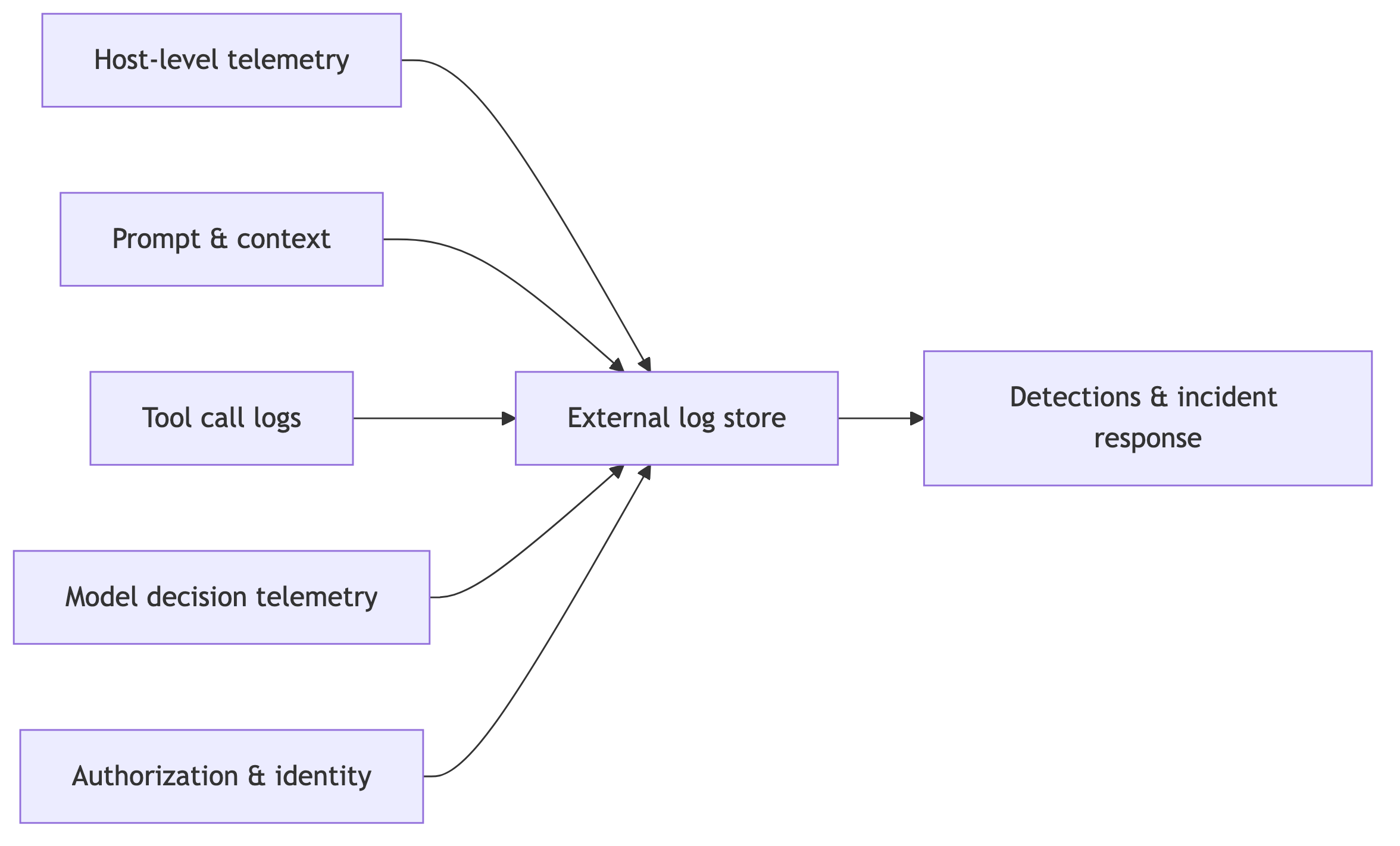
Answering these questions for agentic workloads requires multiple layers of logging: specifically, at the host, prompt, tool, decision, and identity levels.
Host-Level Telemetry
Host-level telemetry tracks what happens within an environment. This is the same telemetry that you would capture for a normal workload. This includes:
- Process execution logs: Every child process that the agent spawns provides useful context for understanding what the agent was trying to do and how it affected the agentic environment.
- Network traffic: Logging every outbound network request, including DNS queries, helps reconstruct which data left the agentic environment and how.
- Filesystem telemetry: Tracking which files were opened, read, modified, and deleted is the single most important way to understand how the agentic environment was changed.
Prompt and Context Collection
Despite agents being non-deterministic, one of the best ways to reconstruct the root cause of an incident is to track the context passed to the agent. The main parts of the context are:
- System Prompt: The system prompt for an agent may change over time, so make sure to store the version of the system prompt that was used at a given time.
- User Prompt: If possible, store the raw prompt a user sends to your agent. However, this may not always be possible due to privacy concerns. If this is the case, storing a redacted prompt may be sufficient.
- Retrieved Context: An agent may choose to add new data to its context by retrieving external files or knowledge bases. Tracking which files, knowledge bases, and other sources the agent used will help recreate the full context.
Tool Call Logs
This is the agent-layer equivalent of process-execution telemetry. These logs should be collected to understand whether tools are selected properly, and to correlate with process executions. This should include:
- Tool Versions: The version of a particular tool used helps determine whether any malicious tools were used in incident response.
- Tool Parameters and Sanitized Arguments: The arguments that were passed to each tool.
- Permissions: Record whether each permission request was granted or denied.
Tool versions, tool parameters, sanitized arguments, and whether permissions were granted or denied for a particular tool call will help detect misused tools and fully reconstruct incidents from the agent’s perspective.
Model Decision Telemetry
Often neglected, model decision telemetry helps understand why an agent took certain actions. Reasoning metadata and tool selection rationale help explain the decisions behind particular actions, which helps teams tune faulty agents.
Useful reasoning metadata includes decision summaries and confidence scores. While storing entire chain-of-thought logs is tempting, these typically contain an enormous amount of data, can contain PII, and are not the highest fidelity for recreating an incident.
Authorization and Identity Context
Who invoked the agent, with what permissions, and in what environment. This helps identify the blast radius of a particular bad action, as well as whether an incident was caused through accidental or malicious means. This can also help detect overprivileged agents and verify that everything is designed with least privilege in mind.
Log Analysis
The final part of setting up an agent logging strategy is securely storing, correlating, and analyzing data.
As with normal logging data, logs should be stored in an environment that the agent cannot access. A common mistake is letting agents write to their own log store. This is insecure, as agents cannot be directly trusted to report their activity; they may forget or lie about actions they have conducted. Logs should be collected by the agentic harness at the agent orchestration layer and the kernel level for host-level telemetry and streamed to an external log store.
Log data should be linked using session IDs, which map host-level telemetry to a specific workload, allowing you to connect all events within a given run.
Detections and Incident Response
Agents can act much faster than humans, which makes continuous monitoring of agent logs essential. Good detections can help spot risky or malicious behavior before it becomes a larger incident.
The main threat vectors introduced by agentic workloads are prompt injection, data exfiltration, and credential misuse. For each of these, some useful detection rules may be:
- Unusual tool call selections: Tools that are infrequently selected, or called with unusual arguments, may indicate that an agent has been misaligned. For example, bash tool calls with unusual shell arguments can be detected by rules that parse the command line and flag risky patterns.
- Frequent or unexpected permission requests: Unexpected permission requests could signal that an agent is trying to exceed its normal scope, use a risky tool, or recover from previous failed attempts.
- Unusual network destinations: Unusual network traffic might indicate that an agent has been misaligned and potentially exfiltrated data. Traditional network monitoring tools can help determine whether an endpoint is potentially malicious.
- Sensitive document access: An agent attempting to access sensitive documents can also be a sign that it is attempting to exfiltrate data. Filesystem telemetry can help you detect whether an agent is trying to access paths such as /etc/, SSH keys, credential stores, or other confidential documents.
- Unusual identity usage: If a credential or a service identity is used unexpectedly, such as from an unusual IP address, or from a service that has not previously used that credential, this is a good sign that the environment has been compromised and should be investigated further.
- Host-level telemetry unassociated with a tool call: Host-level telemetry unassociated with a tool call, such as a shell call that doesn’t directly correspond to a bash tool call, could be a sign that unauthorized actors have accessed the host.
Conclusion
Agentic workloads create their own logging challenges. The telemetry required to secure agents is less like a traditional application log and more like a combination of audit logs, EDR telemetry, and cloud activity logs. Organizations that only create prompts and responses may struggle to investigate incidents. However, those that build comprehensive telemetry will be able to proactively detect abuse, remediate incidents, and securely scale agent deployments.
If you want a read on whether your agent telemetry would hold up in a real investigation, our [Agent Security Assessment] looks at exactly that.
Checklist
- Set up Logging
- Host-level telemetry
- Identity and Attribution Events
- Prompt and Context Collection
- Tool Call Logs
- Set up Detections
- Prompt injection
- Unusual tool call selections
- Unexpected and frequent permission requests
- Data Exfiltration
- Unusual network destinations
- Sensitive document access
- Tool Abuse
- Process execution logs that do not match tool call records
- Credential Abuse
- Unusual identity usage
- Prompt injection
Stay in the loop.
Subscribe for the latest in AI, Security, Cloud, and more—straight to your inbox.
